In-App Chat

Build a chat in 10 lines of JavaScript

Type a message, press Enter, and watch it come back through PubNub. Open a second tab to chat between the two. The whole chat is one publish, one subscribe, and one listener in plain JavaScript.

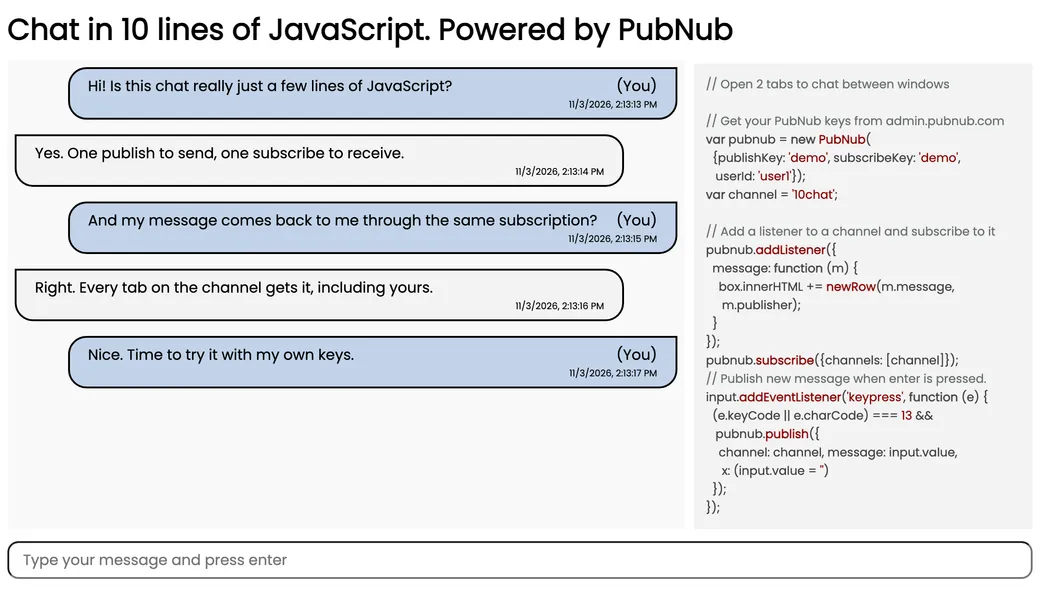
The Chat in 10 Lines of Code demo: a conversation between two browser tabs on the left, the PubNub code that runs it on the right, and a message box below
About this demo

A minimal starter, not a full chat app

This demo is a single HTML page. It loads the PubNub JavaScript SDK from the CDN and uses three calls: it adds a listener, subscribes to the 10chat channel, and publishes what you type when you press Enter. Every message, including your own, reaches the page through that subscription. The code panel next to the chat shows the same lines.

It's kept small on purpose. There are no user names, no message history, and no rooms. A new tab starts empty and only shows messages sent while it's open. The demo runs on PubNub's public demo keys, so anyone else on the demo channel can see what you send. To go further, follow the chat tutorial, which adds channel lists, typing indicators, and more.
Features

What you can do

  • Send a message

    Type in the box and press Enter. The page calls pubnub.publish() with your text on the 10chat channel and clears the box.

  • See it come back

    The page doesn't draw your message when you send it. It waits for it to arrive through the subscription, like everyone else's, and marks it "(You)" when the publisher matches your user ID.

  • Chat between two tabs

    Open the demo in another tab or on another device. Each copy gets its own random user ID and subscribes to the same channel, so messages from one show up in the other.

  • Read the code beside the chat

    On wider screens, a panel next to the chat shows the PubNub code that runs it: the setup, the listener, the subscribe call, and the publish on Enter.

  • Run it with your own keys

    The demo uses the shared demo keys. Create a free account, copy your publish and subscribe keys from the Admin Portal, and paste them into index.html to get a private channel.

Build it yourself

Make your own 10-line chat

Clone the repository, add your own keys, and open the page in two tabs. It has no build step and no dependencies to install.

GitHub

PubNubDevelopers/JavaScript-Simple-Chat

Clone the repository and replace the 'demo' publish and subscribe keys in index.html with the keys from your PubNub account. Then open index.html in your browser.

git clone https://github.com/PubNubDevelopers/JavaScript-Simple-Chat.git
View on GitHub
Keep building

Build interactive real-time experiences with PubNub

Bring chat, live updates, and real-time interactions into your application without building the infrastructure from scratch.