In-App Chat

Group and 1:1 chat built with the Chat SDK

Pick a name and start chatting. Join public channels, start 1:1 and group chats, and reply in threads, with reactions, mentions, and read receipts. Open source, built with Next.js and the PubNub Chat SDK.

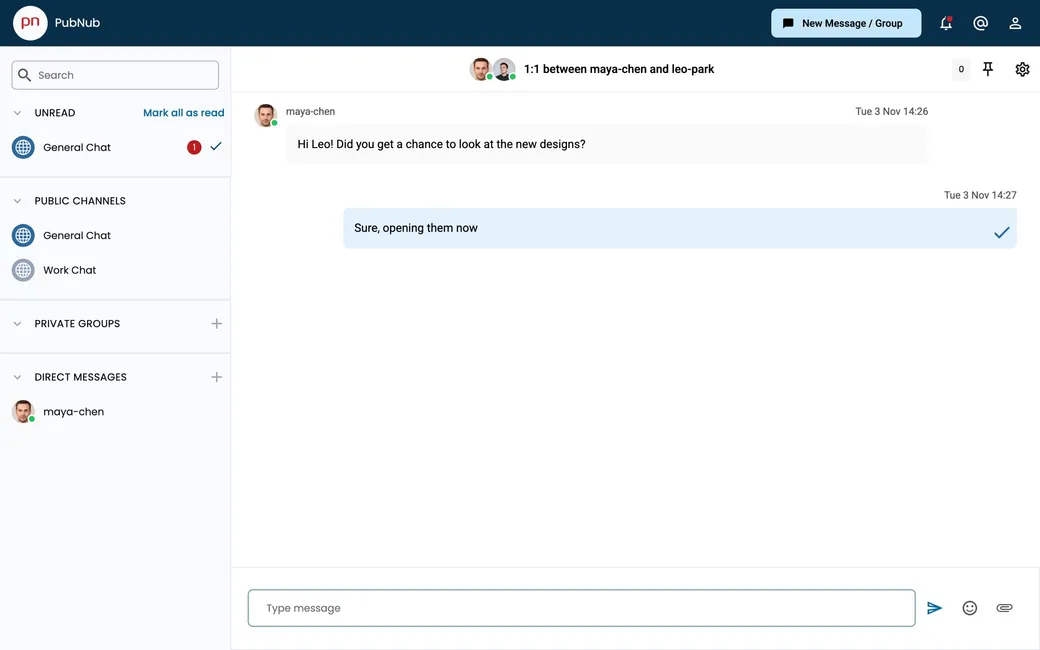
The Chat demo: a 1:1 conversation between two users, with public channels, private groups, and direct messages in the sidebar
About this demo

A full chat app on the PubNub Chat SDK

The Chat demo is an open-source Next.js app built with the PubNub Chat SDK. Enter any name to log in. The app creates your user and puts you in two public channels, General Chat and Work Chat. From there you can start 1:1 chats and private groups with other people using the demo.

Users, channels, and memberships are saved with App Context, so your chats are still there when you log in again. Each channel loads its recent messages from Message Persistence. On the hosted demo, messages are kept for one day. Each user gets an Access Manager token before connecting. The demo is open to everyone, so don't post anything private. To see both sides of a chat, open it in two browser windows with different names. The source code is on GitHub.
Features

What you can do

  • Chat in public channels, 1:1, and groups

    Talk in the two public channels, or search for a user and start a direct chat. Pick two or more people to create a private group. New chats show up for the other members right away.

  • React, quote, and pin

    Hover over a message to react with an emoji, quote it in your reply, or pin it to the top of the channel. Everyone in the channel sees the change live.

  • Reply in threads

    Open a thread on any message and keep the side conversation out of the main channel. The parent message gets a Replies link.

  • Mention users and reference channels

    Type @ and the first letters of a name to mention someone, or # to link a channel. Mentioned users see a pop-up with the message.

  • Typing, read receipts, and unread counts

    See when someone is typing in a 1:1 or group chat and when your message has been read. Channels you are not looking at show an unread count, and you can mark them all as read.

  • Online status, profiles, and group settings

    A green dot shows who was active in the last few minutes. Change your display name or a group’s name, and other users see the update without a reload.

Build it yourself

Run your own Chat demo

Clone the app, add your own keys, and run it locally. The README explains each Chat SDK feature the demo uses.

GitHub

PubNubDevelopers/Chat-SDK-Demo-Web

The complete source. Enable App Context and Message Persistence on your keyset, add your keys to .env, then run yarn install and yarn dev in chat-sdk-demo-web.

git clone https://github.com/PubNubDevelopers/Chat-SDK-Demo-Web.git
View on GitHub
Keep building

Build interactive real-time experiences with PubNub

Bring chat, live updates, and real-time interactions into your application without building the infrastructure from scratch.