In-App Chat

Group chat in Flutter with the PubNub Dart SDK

Join a group chat built with Flutter and the PubNub Dart SDK. Send messages, see who is online, and set a name that everyone else sees.

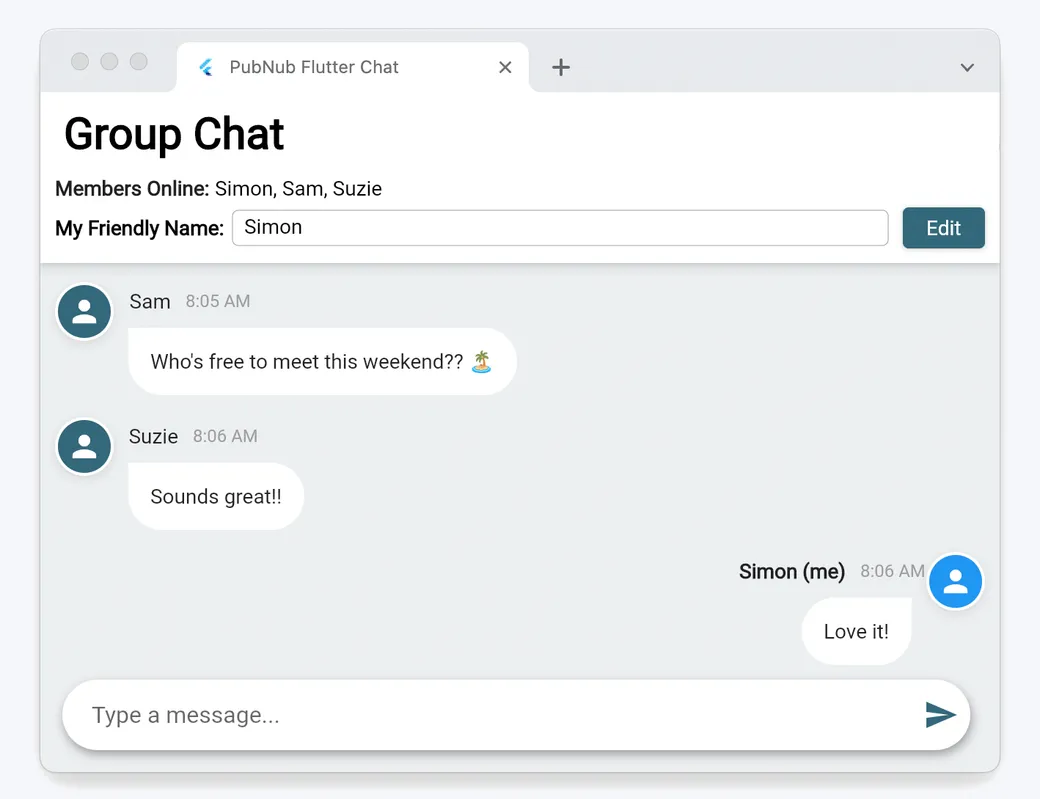
The Flutter chat demo: a Group Chat screen with the members online, a friendly name field, and chat messages from three users
About this demo

One Flutter app, one group chat

This is a getting-started chat app written in Dart with Flutter and the PubNub Dart SDK. The demo runs the web build. The same code runs on Android, iOS, macOS, Windows, and Linux.

Everyone who opens the demo joins one channel, group_chat. The app subscribes to it with Presence, loads the last few messages from history, and keeps each user's name in App Context. It has no server of its own. In the hosted demo, each visitor gets an Access Manager token from a small token service before connecting. The source code is on GitHub, and the README walks you through running it with your own keys.

Features

What you can do

  • Send and receive messages

    Type a message and press Enter. The app publishes it to the group_chat channel, and everyone subscribed sees it right away. Open a second tab to chat with yourself.

  • See who is online

    The header lists the members online. The app asks hereNow who is in the channel when it starts, then updates the list from join, leave, and timeout events.

  • Catch up on recent messages

    When you join, the app fetches the 8 most recent messages from Message Persistence, so you see what was said before you arrived.

  • Set your friendly name

    Click Edit, type a name, and save it. The app stores it as your user metadata in App Context, and other members see your messages and presence under that name.

  • See name changes live

    Each user sets a channel membership in App Context, so the app receives an event when someone renames themselves and updates their name everywhere.

  • Connect with a token

    Before it connects, the hosted demo requests an Access Manager token for your user ID and sets it on the client. The token grants access to the group_chat channel.

Build it yourself

Run the Flutter chat app

Clone the app, add your own PubNub keys, and run it in Chrome or on any device Flutter supports.

GitHub

PubNubDevelopers/GettingStarted-Flutter-SDK-Tutorial

Enable Presence, Message Persistence, Stream Controller, and App Context on your keyset. Add your publish and subscribe keys to lib/utils/keys.dart, run flutter packages get, then flutter run -d chrome.

git clone https://github.com/PubNubDevelopers/GettingStarted-Flutter-SDK-Tutorial.git
View on GitHub
Keep building

Build interactive real-time experiences with PubNub

Bring chat, live updates, and real-time interactions into your application without building the infrastructure from scratch.