Real-time Streaming

Chat, vote, and build fan communities around a basketball game

Join the fan hub for an Orlando Magic vs. Brooklyn Nets basketball game. Chat with other fans, vote for your team, and start your own fan community with a trivia question at the door. Built with Next.js and the PubNub Chat SDK.

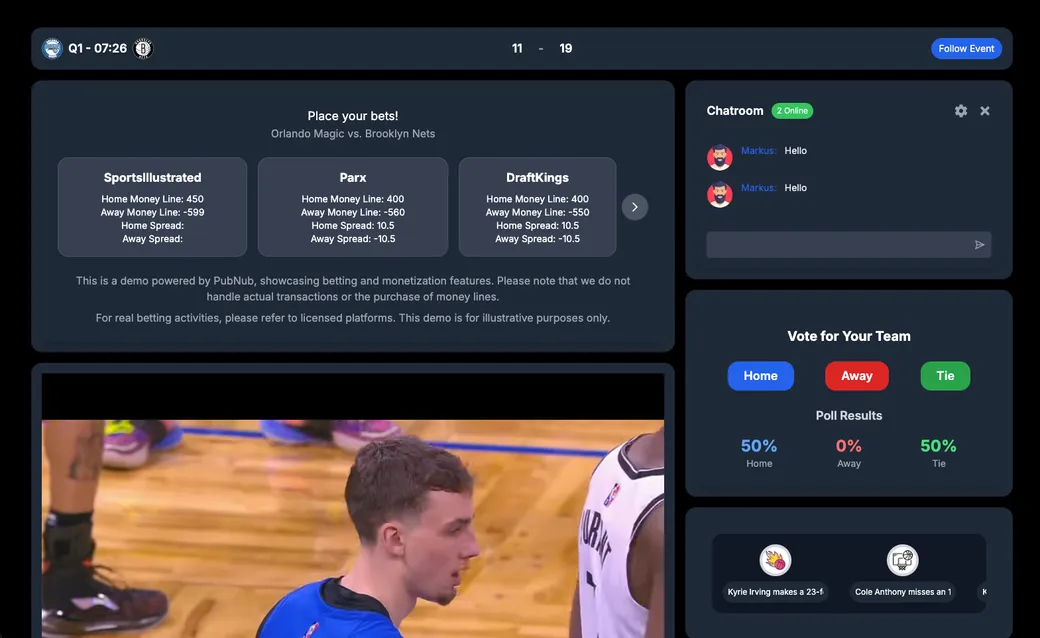
The Sports, Media & Entertainment demo: the Orlando Magic vs. Brooklyn Nets scoreboard, sportsbook odds, the game video, the chatroom, the team vote, and the play-by-play timeline
About this demo

A fan hub for game night

This demo is a fan app for a basketball game between the Orlando Magic and the Brooklyn Nets. You pick a name and an avatar, and the app saves them in your PubNub user profile with App Context. It then joins the global chat, the team vote, and the game channels. The web app is built with Next.js and the PubNub Chat SDK, which runs on the PubNub JavaScript SDK.

Fans can create their own communities, and everyone else can find and join them from the chat. The repo also includes a Node.js simulator that replays the game's play-by-play and pregame sportsbook odds over PubNub channels. Those messages drive the scoreboard, the team stats, the play timeline, a game video that follows the plays, and a play-money betting panel. The source code is open on GitHub.

Features

What you can do

  • Join with a name and avatar

    Pick a username and one of nine avatars to log in. Your profile is stored with App Context, and you can change your avatar later from the profile menu.

  • Chat with other fans

    Send messages in the Global Chat. The last 20 messages load from Message Persistence when you join, so you can catch up on the conversation.

  • See who is online

    The badge next to the chat name shows how many fans are in the room right now. The count comes from Presence and updates as fans join and leave.

  • Vote for your team

    Pick Orlando, Brooklyn, or a tie. Your vote is published to the poll channel, and the results combine stored votes with new ones as they arrive.

  • Start a fan community

    Click Create Community, give it a name and a description, and the app creates a public channel for it. Other fans can search the community list and join it from the chat.

  • Gate a community with trivia

    Add an optional trivia question when you create a community. It is saved in the channel's App Context data, and new members answer it before they can chat.

Build it yourself

Make your own Sports, Media & Entertainment app

Clone the app, add your PubNub keys, and run the web app. Start the simulator from the repo to replay the game: it feeds the scoreboard, stats, timeline, game video, and betting panel.

GitHub

PubNubDevelopers/Sports-Media-Entertainment-Demo

The complete source. Set NEXT_PUBLIC_PUBNUB_PUBLISH_KEY and NEXT_PUBLIC_PUBNUB_SUBSCRIBE_KEY for a keyset with App Context, then run npm install and npm run dev. For the game feed, add your keys to simulations/.env and run node script.js in the simulations folder.

git clone https://github.com/PubNubDevelopers/Sports-Media-Entertainment-Demo.git
View on GitHub
Keep building

Build interactive real-time experiences with PubNub

Bring chat, live updates, and real-time interactions into your application without building the infrastructure from scratch.